OFFLINE FIELD ASSURANCE
Capture the inspection. Carry every finding to verified closure.
Fenwix is an offline field inspection app for Android. Complete the checklist, capture photo and audio evidence, manage corrective actions and generate a handover-ready PDF on the device. No Fenwix account is required.


Field work does not wait for a connection
Inspection, evidence capture and PDF generation work without an internet connection.
Inspection content stays on your device
The core Solo workflow requires no Fenwix account. Records remain encrypted in app-private local storage and are not uploaded to a Fenwix field-data server.
Your history does not disappear behind a paywall
The subscription controls creation of new work. Existing inspections, reports and supported export operations remain accessible.
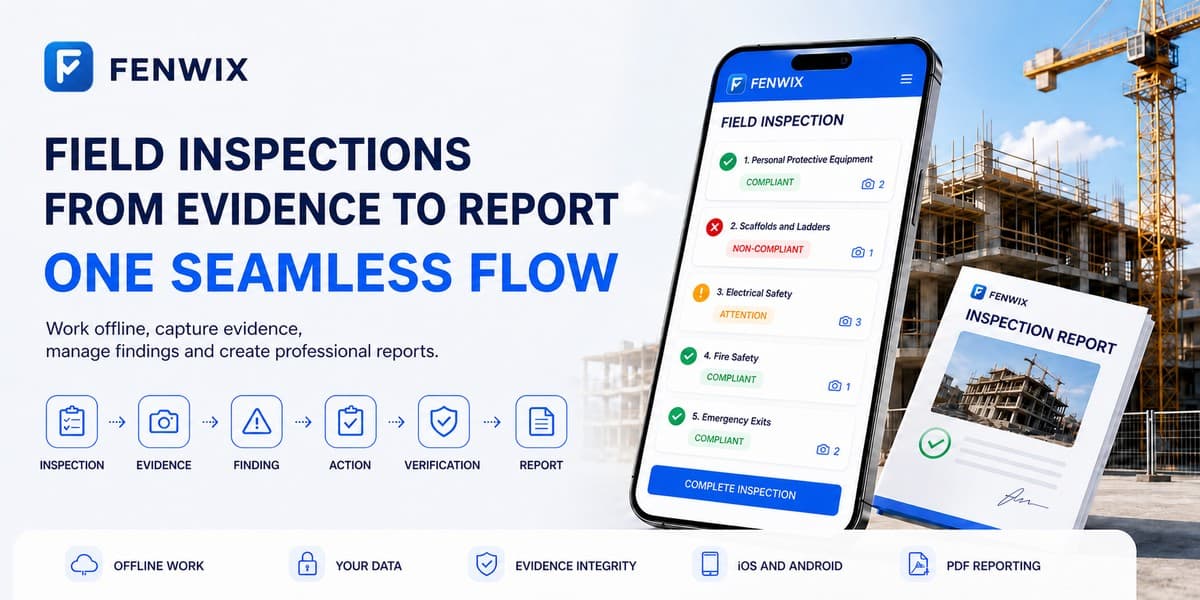
Field Assurance is more than a checked box.
A checklist records an answer. Fenwix preserves the operational chain behind it: what was inspected, what evidence was captured, what failed, what action followed and whether closure was verified.
- Inspection
- Evidence
- Finding
- Corrective action
- Evidence submitted
- Verification
- Report + asset history
When the connection stops, field work should continue.
Basements, construction sites, plant rooms and remote assets are normal working environments. Fenwix keeps the core inspection workflow independent of a cloud round trip. Records and evidence stay local, and the PDF is built on the device.
- Answers, notes and progress are written locally as the inspection proceeds.
- Photos, audio notes and visual signatures remain on the device.
- The PDF report is generated without an internet connection.
- The finished report can be saved to the device, shared or printed when the selected channel is available.
Keep every answer with the evidence that supports it.
A pass or fail answer is not enough on its own. Fenwix links photos, audio notes, written context and supported location data to the relevant inspection item. A SHA-256 content hash is calculated when a photo file is written, and its camera or gallery source is recorded.
- Live-capture and imported-photo distinction
- SHA-256 content hash created at file write
- Separate annotation layer that leaves the original image unchanged
- Location, accuracy and time data where captured
A finding is not resolved because somebody pressed close.
An after-photo is evidence of a correction, not the closure decision itself. Fenwix separates evidence submission from verification, turning a failed item into a traceable corrective action with risk, responsibility and timing.
- Risk level: low, medium, high, critical
- Corrective action, responsible person and due date
- Emergency measure and root cause fields
- Evidence added and verified closure are separate steps
- Closed findings can be reopened when the problem returns
Connect inspections to the history of the asset, not just the form.
When a ladder, scaffold, extinguisher, vehicle or machine is inspected again, its previous context should remain visible. Fenwix keeps the asset code, inspection history, next due date, open findings and service state together in the same local data context.
- Asset list with search, overdue and out-of-service filters
- Inspection history per asset
- Next inspection date and overdue tracking
- Out-of-service and return-to-service states

Leave the site with a report built for handover and action.
A Fenwix report does more than repeat checklist answers. It organizes company identity, report number, revision, compliance summary, significant findings, open actions and linked evidence into one portable output. The inspecting company remains the visible owner of the report.

- Report number that stays fixed across revisions
- Compliance summary with the formula printed on the report
- Critical findings and open actions on the first page
- Evidence photos, signatures and a verification block with QR
Report identity that can be compared with the source record
Each completed report has a stable identity and revision. Fenwix can compare verification information with the source inspection record and recheck linked photo evidence available on the device. This verifies the source record; it does not guarantee that a PDF held elsewhere has never been edited.
The subscription can end without locking away your history.
Past inspections remain available for viewing. Reporting, PDF sharing, supported export, backup, restore and verification remain accessible for existing records. The subscription controls new work, not access to completed history.
Different fields. The same assurance chain.
Construction safety, industrial field service and facilities or HVAC work involve different inspection points. Fenwix preserves the same core chain across them: inspection, evidence, finding, corrective action, verification and report.
Construction & EPC
Fenwix runs construction safety inspections offline, links each failure to evidence, turns it into a corrective action with responsibility and timing, and generates a PDF report from the field record.
Industrial Field Service
A service tech sees a machine twice a year. The machine's history should not depend on what the last tech remembers.
Facilities & HVAC
Plant rooms are concrete boxes with no signal, and a facility's credibility is its maintenance record.
Start with a field-ready inspection template
Choose from built-in templates for general site safety, electrical work, working at height, fire safety, scaffolds, work equipment, excavation, HVAC, plumbing, vehicles and property inspections, then adapt the selected template to the job. Questions are snapshotted when an inspection starts, so later template edits do not rewrite a completed record.
- General Construction Safety
- Electrical Work
- Working at Height
- Fire Safety
- Scaffold
- Work Equipment
- Templates →
Inspection content is not ordinary usage data
Fenwix keeps core field records in encrypted app-private local storage, makes every portable output an explicit user action and excludes inspection content from product analytics payloads. Current controls and future enterprise architecture are labeled separately at Fenwix Trust & Technology.
Frequently asked questions
What is Fenwix?
Fenwix is an Android app that combines offline inspections, evidence capture, findings and corrective actions, asset history and PDF reporting in one local field workflow.
Does Fenwix work without internet access?
Yes. Completing inspections, capturing photo and audio evidence, adding visual signatures and generating the PDF work offline. Sending the report through another service depends on the connection requirements of that service.
Do I need a Fenwix account?
No. The core Solo workflow does not require a Fenwix account. Inspection records remain encrypted in app-private local storage on the device.
Does a SHA-256 hash prove that evidence is true?
No. A content hash helps determine whether the compared file still matches the recorded version. It does not prove what a photograph means or whether a statement is true.
What does Fenwix report verification check?
Fenwix compares report identity and verification information with the source inspection record, rechecks supported linked photos and displays source values for comparison.
Are Fenwix signatures qualified electronic signatures?
No. They are drawn, imported or photographed visual signature records. Fenwix does not claim qualified electronic-signature status or a specific legal effect for them.
What happens when the subscription ends?
Creation of new work is restricted. Existing inspections and the supported operations attached to those records remain accessible.
Complete the next inspection in the field.
Start with 24 hours of free local work and one free report output every 24 hours. Eligible users can then try Pro for 3 days.
- 24 hours of free local work
- 3-day Pro trial for eligible users
- No Fenwix account required
Join the Fenwix for Web early-access list.
Receive a notification when the web version is ready to try. The address is used for early-access availability, not a general marketing list.